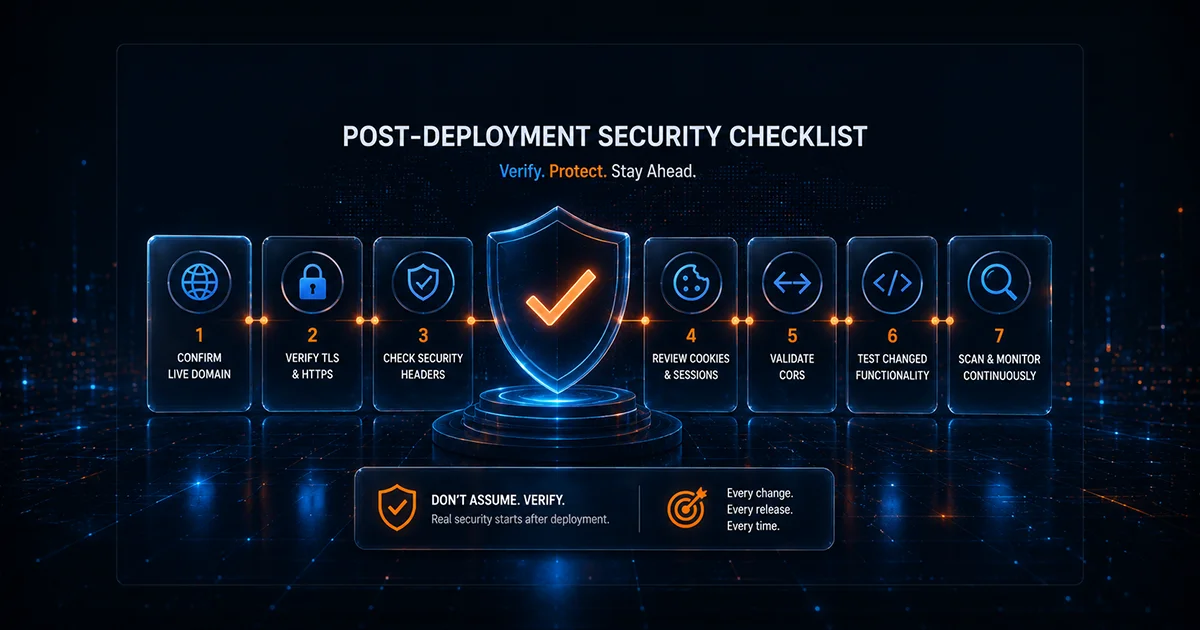
Security work often stops at the wrong moment. A developer fixes a vulnerability, the pull request is approved, automated tests pass, and the deployment finishes successfully. Everyone assumes the security issue is closed. But the only state that matters to an attacker is the state that actually reached production.
Deployments can fail selectively. A CDN can serve an old asset. A reverse proxy can remove a header. A migration can restore a backup path. A feature flag can expose code staging did not use. A cookie can behave differently because production terminates TLS at another layer. A dependency can be upgraded in the repository while an old frontend bundle remains cached.
A post-deployment security review closes that gap. It does not need to become a multi-hour penetration test after every minor content change. The goal is to match verification effort to the security impact of the release and confirm that the deployed public application behaves the way the team intended.
Which releases need additional security validation?
Every deployment deserves normal quality assurance, but deeper security verification should focus on changes that can alter trust boundaries, exposed functionality, authentication, data handling, or infrastructure.
Examples include:
- Authentication, password reset, MFA, or session changes.
- New forms, search functionality, uploads, or user-controlled input.
- New APIs or authorization logic.
- Framework, CMS, plugin, theme, or major dependency upgrades.
- New payment, analytics, identity, chat, or other third-party scripts.
- CDN, WAF, reverse-proxy, load-balancer, or hosting changes.
- DNS, certificate, or HTTPS configuration changes.
- Changes to CSP, CORS, cookies, headers, or redirects.
- New administrative routes or deployment-pipeline behavior.
- Fixes for previously identified vulnerabilities.
A low-risk content update may need only routine validation. A change to authentication or edge infrastructure deserves much more attention.
1. Confirm the intended build is actually live
Before interpreting security results, verify that you are testing the expected release. Caching, rolling deployments, multiple regions, and blue-green infrastructure can result in different users receiving different builds.
Use a non-sensitive build identifier, asset hash, release marker, or known behavior where available. If the release fixes a specific vulnerability, verify the production behavior that was supposed to change rather than relying solely on the deployment dashboard.
2. Verify HTTPS and certificate behavior
Normal code releases may not affect certificates, but infrastructure releases frequently do. Confirm that important hostnames still present trusted HTTPS and use the expected redirect behavior.
Vulnify's SSL Checker can validate certificate trust and lifecycle signals. If the change involved the CDN, load balancer, or TLS stack, use TLS Deep Analysis for deeper protocol, cipher, and chain inspection.
Also verify HTTP to HTTPS redirects. Edge changes commonly create loops or unexpected intermediate hosts.
3. Verify security headers on live routes
OWASP's Secure Headers Project documents how HTTP response headers can reduce browser-side risk. Those controls need post-deployment verification because middleware, reverse proxies, and CDNs can modify the final response.
Run the Security Headers Analyzer against representative routes. Include the homepage, login, account area, checkout, API responses where applicable, and routes handled by separate services.
Pay particular attention to Content-Security-Policy after adding new scripts or embeds, HSTS after edge or TLS changes, framing protection after introducing embedded content, Referrer-Policy on sensitive routes, and X-Content-Type-Options across different response types.
Use the CSP Checker or HSTS Checker when one policy needs deeper validation.
4. Verify cookies after authentication or platform changes
Session security is sensitive to the environment in which the application runs. A release can unintentionally remove Secure, HttpOnly, or alter SameSite. Domain and Path scope can also become broader than intended.
Run the Cookie Security Checker against login, authenticated account, and checkout flows after changes to authentication, SSO, proxies, or framework middleware.
Do not apply one SameSite setting blindly to every cookie. Embedded payment systems and federated identity flows may have different legitimate cross-site requirements from a standard first-party session.
5. Verify CORS after API and frontend changes
CORS regressions often happen when a frontend hostname changes or a new application is added. Developers may temporarily use a wildcard or overly broad origin reflection to make browser requests succeed and then forget to tighten the policy.
Use Vulnify's CORS Checker against affected API routes. Confirm allowed origins, credentials behavior, and preflight handling match the intended architecture.
CORS is not an authorization system. A secure API still needs authentication and object-level access control regardless of which browser origins are permitted.
6. Verify HTTP methods on changed routes
Framework and API gateway changes can alter method handling. An endpoint may suddenly accept PUT, PATCH, DELETE, or another method that was not intended.
Use the HTTP Methods Checker after routing and API infrastructure changes. The objective is to confirm that each route exposes only the methods it requires and applies proper authorization to state-changing operations.
7. Check for exposed deployment artifacts
Release systems create files that should never be public. Archives, configuration exports, logs, source maps, debug endpoints, source-control metadata, and old releases can become reachable if the build process copies them into a web-accessible location.
Use the Exposed Paths Checker after deployment-pipeline changes, CMS updates, migrations, and emergency releases.
Remove sensitive artifacts from the public web root rather than relying on obscurity or assuming attackers will not guess the filename.
8. Verify redirect behavior
Routing changes can introduce loops, stale hosts, unnecessary hops, or incorrect absolute URLs. Authentication and password-reset flows deserve additional attention because applications often construct links using host and scheme information.
Use the Redirect Chain Checker for normal routing changes. If the release adds or modifies user-controlled redirect parameters, use the Open Redirect Checker for focused validation.
9. Check mixed content after frontend changes
New content and restored templates can introduce HTTP resources into HTTPS pages. Scripts and styles are especially important because insecure active resources undermine the trusted page context and may be blocked by modern browsers.
Run the Mixed Content Checker after CMS releases, theme changes, migrations, and third-party integrations. Fix the source reference rather than patching only one rendered page.
10. Verify exposed JavaScript dependencies
Dependency changes should be verified in the built production application. A package can be upgraded in the repository while an old bundle remains cached or a CMS theme continues loading another copy.
Use the JS Library Vulnerability Checker to inspect public library and version evidence after frontend dependency work. External detection does not replace repository-level software composition analysis, but it helps answer whether old components remain visible in the deployed site.
11. Review unexpected technology disclosure
Infrastructure changes can expose new server banners, framework identifiers, generator metadata, or CDN signals. Disclosure is generally lower priority than an exploitable vulnerability, but unexpected stack changes may indicate the release reached infrastructure different from what the team expected.
Run the Website Technology Fingerprint and compare the result with the previous public baseline.
12. Run a broader scan when the release justifies it
Focused tools answer focused questions. Significant releases deserve broader automated testing with the Website Security Scanner.
A broader scan is particularly useful after major feature launches, authentication or authorization changes, new user-controlled input, framework upgrades, large routing changes, and remediation of high-severity vulnerabilities.
Choose the scan depth according to the importance and complexity of the release. Use the live Vulnify scanner page for current depth details rather than maintaining outdated static numbers in your internal process.
13. Retest the specific vulnerability fix
A broad scan is useful, but a security fix should also be verified directly. If the finding involved HSTS, test HSTS. If the issue involved an exposed backup path, request that path after remediation. If the issue involved CORS, retest the affected origin behavior.
This matters because a deployment marked successful does not prove the fix is effective. A changed overall score also does not necessarily prove that the exact vulnerability was closed.
14. Record meaningful differences
Post-deployment security should create useful evidence rather than an unowned collection of screenshots. Record the release identifier, security-relevant changes, tests performed, new findings, resolved findings, accepted risks, responsible owners, and follow-up actions.
This makes later troubleshooting much easier and helps teams distinguish a long-standing condition from a regression introduced by the latest release.
15. Monitor after the immediate release window
Some security changes appear only after caches expire, scheduled jobs execute, certificates renew, or teams make rapid follow-up deployments. One post-release review cannot detect everything that changes later.
Vulnify's Website Watch provides a daily pulse for selected public-origin signals and a weekly Standard or Deep scan. It can alert when new or worsened conditions appear after the baseline.
A practical post-deployment workflow
Immediately after release:
1. Confirm the expected build is live.
2. Test the changed user flow.
3. Verify HTTPS, redirects, and important headers.
4. Test cookies, CORS, methods, or CSP if those controls changed.
5. Check for exposed deployment artifacts.

For security-relevant releases:
6. Run focused tools against changed controls.
7. Run a broader authorized vulnerability scan.
8. Verify the exact fix for previous findings.
9. Record new, resolved, and accepted findings.

After release:
10. Monitor the public origin for later drift.
Prioritize risk, not finding count
A release review can produce many observations. Do not treat them equally. Prioritize using severity, exploitability, public exposure, asset importance, and confidence in the evidence.
A newly exposed archive containing credentials should outrank a low-value header improvement. Broken authorization on an administrative API should outrank a cosmetic technology disclosure. A certificate expiring tomorrow may require immediate operational attention even if another issue has a technically higher scanner score.
Vulnerability management succeeds when findings have owners and realistic deadlines, not when teams simply fix the easiest scanner items first.
Avoid checklist theater
A checklist is useful only if it changes behavior. Do not run tools simply to generate a green status. If a control is intentionally different after a release, document the reason. If a finding is accepted, assign an owner and review date. If an important issue cannot be fixed immediately, apply an appropriate compensating control and track permanent remediation.
Verification should also remain proportional. A typo correction does not deserve the same process as a new authentication system. Mature teams can define release-risk classes so developers know when focused validation, a full scan, or deeper testing is expected.
Post-deployment website security checklist
- Confirm the intended build is live.
- Verify HTTPS, certificate trust, and redirect behavior.
- Check security headers on representative routes.
- Validate cookies after authentication or proxy changes.
- Review CORS after frontend and API origin changes.
- Check HTTP methods after routing or gateway changes.
- Look for exposed backups, debug paths, and release artifacts.
- Verify redirects and open-redirect behavior where relevant.
- Check mixed content after frontend and CMS releases.
- Verify public JavaScript dependency evidence after upgrades.
- Compare technology fingerprints with the expected stack.
- Run a broader scan for meaningful security-relevant releases.
- Retest the vulnerabilities the release was intended to fix.
- Record findings, owners, accepted risks, and follow-up.
- Monitor production for later configuration drift.
Conclusion
A release is not security-complete simply because the pipeline says deployment succeeded. It is security-complete when the intended controls and fixes are observable on the production system users actually reach.
Build a lightweight post-deployment habit around the changes that matter. Verify transport, headers, sessions, routing, exposed paths, dependencies, and the exact controls touched by the release. Use focused Vulnify security tools for rapid validation, the Website Security Scanner for broader authorized assessments, and Website Watch when you want to detect later drift. The outcome should be evidence that production matches the security intent, not simply confidence that the code looked correct before it shipped.