What happened
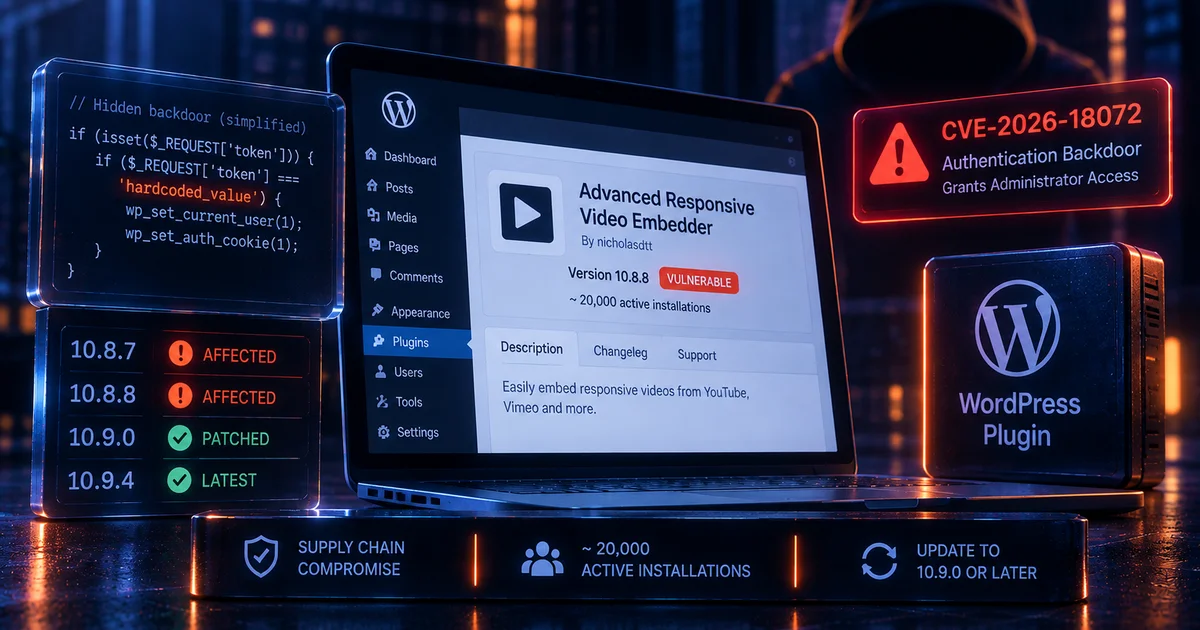
CVE-2026-18072 is a critical authentication bypass caused by a deliberately introduced backdoor in Advanced Responsive Video Embedder, a WordPress plugin with approximately 20,000 active installations. Wordfence PRISM detected the malicious code on July 28, 2026, less than two hours after it was introduced.
This was not a normal programming mistake. Wordfence describes it as a software supply-chain attack in which malicious code was added to the plugin source. A concealed function accepted an attacker-controlled token and could authenticate the requester as an existing administrator without a password, nonce, or normal capability check.
The affected versions were 10.8.7 and 10.8.8. Wordfence assigned the issue a CVSS score of 9.8 and the CVE identifier CVE-2026-18072. Version 10.9.0 removed the malicious backdoor, and the public WordPress.org listing now shows later releases, including 10.9.4.
The incident contains an important piece of mitigating context. WordPress.org told Wordfence that the malicious release had not yet been distributed through the normal plugin update channel when the issue was caught. Sites therefore should not have automatically received the compromised build from WordPress.org. Administrators still need to verify the installed version, particularly if the plugin was obtained or installed manually.
Why this is a supply-chain incident
Most WordPress vulnerabilities are accidental flaws: missing authorization checks, unsafe database queries, weak file validation, or mistakes in authentication logic. CVE-2026-18072 is different because the dangerous behavior was intentionally added.
Wordfence found a hidden authentication path registered very early in the WordPress request lifecycle. It checked attacker-supplied request data against a hardcoded value embedded in the plugin and, when matched, could establish administrator access.
The presence of a universal secret inside publicly distributed source code is effectively a backdoor. Anyone who discovers or extracts that secret can potentially use the hidden path. Because the code was part of the plugin itself, normal password policy would not protect the site.
The trust failure can be summarized as:
Trusted plugin project
        |
        v
Malicious code introduced into release
        |
        v
Backdoor ships inside plugin files
        |
        v
Hidden request path runs before normal authentication
        |
        v
Hardcoded token is accepted
        |
        v
Attacker receives administrator access
The incident demonstrates that dependency security is not only about accidental CVEs. A trusted software distribution channel can become a route for malicious code if developer or repository access is compromised.
What Wordfence observed
Wordfence PRISM identified the authentication bypass rapidly after the malicious change appeared and escalated the issue to the WordPress.org plugin team. WordPress.org closed the plugin for downloads during the response process.
Wordfence recommended uninstalling the plugin at the time of disclosure and treating sites running the affected versions as potentially compromised. That recommendation reflected the severity of a backdoor that required no credentials or user interaction.
However, the WordPress.org team confirmed that the malicious version had not yet been distributed through the repository's automatic update channel. This sharply reduced the number of sites likely to have received the backdoored code through routine updates.
The plugin has since returned to the directory on a later version. The current listing shows 10.9.4, while Wordfence identifies 10.9.0 as the first patched version for the backdoor. Website owners should use the latest supported release rather than deliberately selecting the historical minimum fix.
Affected versions and current status
The affected range is narrow but serious:
Advanced Responsive Video Embedder 10.8.7: AFFECTED
Advanced Responsive Video Embedder 10.8.8: AFFECTED
Version 10.9.0: backdoor removed
Current later releases: use latest supported version
Administrators should not rely only on the version shown in a management dashboard if there is any concern that files were installed manually. Compare the plugin directory against a clean copy obtained from the official WordPress.org source or reinstall the plugin from a trusted current package.
Sites that never installed 10.8.7 or 10.8.8 are not affected by this specific backdoor. Sites that did run one of those versions should receive additional incident review because successful administrator access could have been used to establish persistence elsewhere.
Why it matters for website owners
WordPress site owners routinely trust plugin updates to deliver legitimate maintenance and security fixes. A supply-chain compromise reverses that relationship: the update itself becomes the risk.
Administrator access is especially dangerous because it can provide control over users, content, plugins, themes, settings, and integrations. Depending on WordPress and hosting configuration, an administrator can also install executable plugin code and turn application-level takeover into server-side code execution.
The backdoor bypassed normal credentials. Password rotation alone would therefore not close the malicious path while the affected plugin code remained installed. The compromised software itself had to be removed or replaced.
This also demonstrates why organizations should know where each WordPress component comes from. Plugins installed from unofficial mirrors, copied between sites, or downloaded outside the normal repository can bypass the protections and rapid response available through the official distribution channel.
What to check on your site
- Identify the installed ARVE version. Versions 10.8.7 and 10.8.8 contained the backdoor.
- Update to the latest supported release. Wordfence identifies 10.9.0 as patched, while WordPress.org now lists newer releases.
- Verify the installation source. Determine whether the plugin was updated automatically from WordPress.org, manually uploaded, copied from another site, or obtained from another source.
- Compare plugin files. Replace questionable installations with a clean package from the official repository.
- Review administrator accounts. Look for unknown admins, unexpected email changes, password resets, or sessions that do not match legitimate activity.
- Check installed plugins and themes. Unauthorized admin access may have been used to add a second malicious component.
- Inspect must-use plugins and scheduled tasks. These locations can be used to maintain persistence outside the original plugin.
- Review web and authentication logs. Investigate unusual requests and administrator activity during any period when an affected version was installed.
- Rotate secrets after confirmed compromise. If unauthorized admin access occurred, consider database, hosting, API, SMTP, and other credentials accessible through WordPress potentially exposed.
Why version history matters
Supply-chain incidents require more than checking whether a site is patched today. Administrators need to know whether a compromised release was ever installed.
A site currently running version 10.9.4 could still have been compromised if it previously ran 10.8.7 or 10.8.8 from a source that contained the backdoor. Updating removes the malicious authentication path but does not remove a separate administrator account, plugin, web shell, or scheduled task created while the backdoor was active.
Change-management records, backup snapshots, deployment logs, WordPress update logs, and filesystem timestamps can help reconstruct that history. Organizations managing many WordPress sites should preserve plugin-version inventory over time rather than only recording the current state.
Software supply-chain lessons
The incident shows why plugin provenance matters. A WordPress component may have a strong security history yet still become dangerous if an attacker gains repository or developer access.
Organizations can reduce risk by limiting who can install plugins, using official distribution channels, keeping administrative accounts protected with multifactor authentication, monitoring changes to production plugin files, and removing extensions that are no longer required.
For higher-value sites, deployment pipelines can compare checksums or package hashes against approved artifacts before changes reach production. Unexpected code changes should be investigated even when the version number looks legitimate.
Site owners should also avoid keeping old ZIP archives of plugins in public web directories. Historical packages can contain known vulnerabilities or compromised code and may be accidentally reinstalled during troubleshooting.
Using Vulnify for WordPress review
Vulnify's WordPress Stack Checker can help identify publicly detectable WordPress technology and support external inventory across multiple sites. It is useful for discovering which properties need direct administrative review.
A public scanner cannot determine with certainty whether a historical backdoored plugin version was installed and then removed, or whether an attacker created persistence inside the filesystem. CVE-2026-18072 therefore requires direct version-history, account, and file review where exposure is suspected.
Vulnify's WordPress Security Workflows documentation can help structure public checks alongside internal WordPress administration and follow-up validation.
Recommended response
Any site found running ARVE 10.8.7 or 10.8.8 should be moved to the latest official release and the plugin files should be replaced from a trusted package. If there is uncertainty about where the affected build came from, treat the site as requiring incident review rather than assuming the narrow distribution window made compromise impossible.
Review administrator accounts, authentication events, installed code, must-use plugins, scheduled tasks, and recent filesystem changes. If unauthorized administrator access is confirmed, rotate credentials that could have been accessed and restore affected components from known-clean sources.
Sites that used only the normal WordPress.org update channel have reassuring evidence from WordPress.org that the malicious release was not automatically distributed. Even so, version verification is quick and should be documented.
Related reading
Conclusion
CVE-2026-18072 was not an accidental validation error. Advanced Responsive Video Embedder versions 10.8.7 and 10.8.8 contained a deliberately introduced authentication backdoor capable of granting administrator access to an unauthenticated requester who knew the embedded token.
Wordfence detected the malicious change quickly, and WordPress.org reported that the compromised release had not yet been distributed through its normal update channel. That limits likely exposure, but any site that manually obtained or ran one of the affected versions still requires careful review.
Administrators should use the latest official plugin release, verify version history and installation source, and investigate privileged activity if an affected version was ever present. The incident is a clear reminder that WordPress security depends not only on fixing vulnerabilities but also on protecting the software supply chain that delivers plugins to production websites.