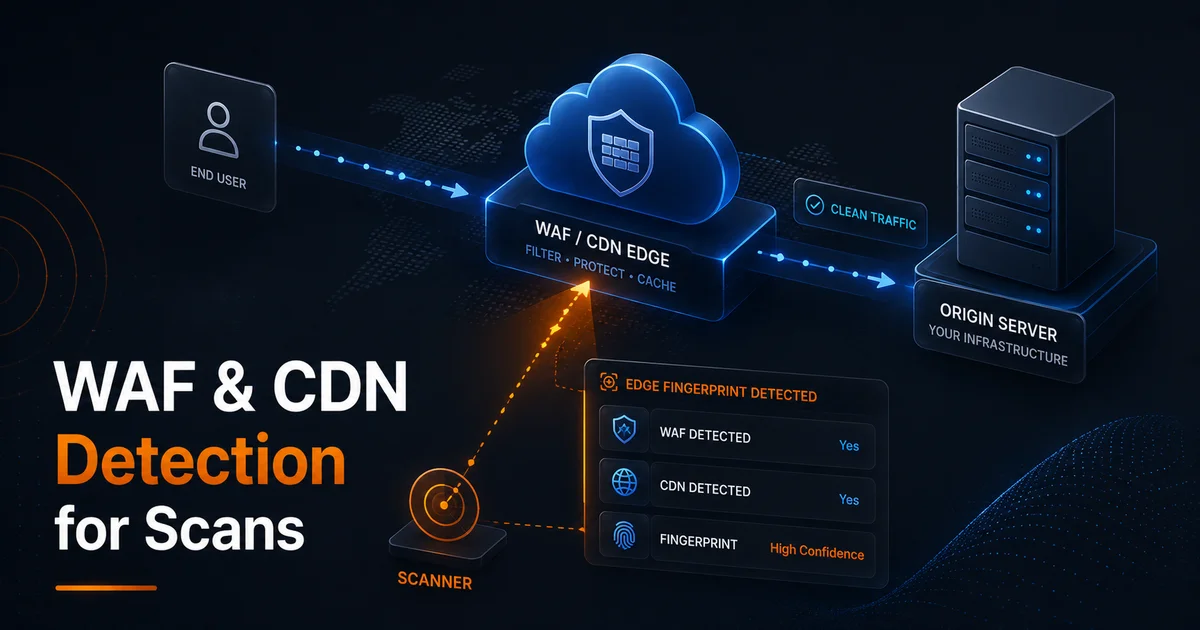
A vulnerability scan that hits only your CDN edge is not the same scan as one that reaches your origin application. Web Application Firewalls block suspicious probes. CDNs cache responses and may serve different headers. Rate limits trigger before your app logs show anything unusual.
Vulnify detects many WAF and CDN fingerprints so you can interpret findings in context—not as noise to ignore, but as a layer that shapes what the scanner could see.
Who Should Read WAF Detection Notes
Developers interpreting individual findings need to know whether a blocked probe reflects app security or edge policy. Security champions presenting to leadership need context so scores are not oversimplified. Pen testers coordinating authorized tests need alignment on allowlists and scope. Detection metadata serves all three audiences if you attach it to every report export.
What Detection Tells You
When the platform identifies Cloudflare, Akamai, Imperva, Sucuri, or similar fronts, it means your results primarily reflect edge behavior: challenge pages, blocked verbs, sanitized error pages, or cached static responses. That is valuable—attackers also hit the edge first—but it is not a complete picture of origin weaknesses.
Detection does not mean "scan failed." It means read severity with edge filters in mind. A missing security header on a cached asset might differ from the dynamic HTML your origin serves.
Common Scan Distortions
- Blocked payloads — SQLi or XSS probes return 403/406 from WAF rules, which can hide true app behavior
- Challenge interstitials — bot management returns HTML that is not your application
- Header injection at edge — CSP or HSTS added by CDN may mask origin gaps or create duplicate policies
- Rate limiting — aggressive scans slow down or stop before covering all paths
Run the headers analyzer on both apex and a known origin-direct hostname if your infrastructure team maintains one. Compare with Permissions-Policy vs security headers guidance when templates differ.
When to Scan Edge vs Origin
Scan the public edge URL for what customers and attackers see first—that matches real-world risk. Schedule origin or staging scans (with authorization) when you need pre-release assurance or when WAF blocks obscure application-level bugs. Document which environment each report represents; mixing them confuses remediation.
Before major launches, use the pre-launch security checklist so DNS, headers, and exposure checks run in a sensible order—WAF-aware interpretation comes after you know what was tested.
Working With Security Teams
Share WAF detection notes in tickets so developers do not chase blocked probes as false positives. Temporarily allowlisted scan IPs are a process decision, not a product default—coordinate with platform owners.
Pair scan results with subdomain takeover and passive discovery checks; attackers often probe unprotected origin hostnames that bypass CDN coverage.
Cloudflare and Bot Management in Practice
Cloudflare-heavy sites frequently return challenge pages to automated scanners while humans pass silently with cookies. That can look like "site unreachable" or generic HTML in scan logs. Document whether your scan ran against the orange-cloud URL, a grey-cloud origin, or a staging hostname. Each answers a different risk question: public edge resilience versus raw application exposure.
Writing WAF-Aware Reports for Leadership
Executives want one number; engineers need context. When presenting results, separate edge-blocked probes from confirmed application findings. Note CDN detection explicitly in the summary slide. Recommend authorized origin or staging rescans when edge blocks hide high-severity classes. This prevents false confidence when the WAF simply absorbed the test.
Origin Exposure Outside the CDN
Direct origin IPs, legacy A records, and forgotten subdomains often skip WAF rules entirely. Attackers enumerate these paths while defenders stare at green edge scans. Combine WAF-aware interpretation with passive subdomain discovery and exposed path checks on any host that resolves outside your CDN footprint.
Vendor-Specific Notes
Akamai and Imperva deployments often terminate TLS early with aggressive bot scores. Sucuri and similar reverse proxies may normalize error pages, hiding stack traces scanners use for fingerprinting. None of this eliminates the need for application testing—it explains why two scanners produce different counts on the same URL. Align on scope before debating findings.
Building a Scan Scope Document
Before the first scan, write one paragraph: target URL, authorized window, WAF/CDN expected, staging vs production, and whether origin-direct testing is in scope. Attach Vulnify detection output to that document when sharing with developers. Scope clarity prevents weeks of argument about false positives that were actually edge blocks.
Pen Test vs Scanner Behind the Edge
Penetration testers often negotiate WAF allowlists and origin scope up front. Vulnerability scanners simulate opportunistic attackers who hit the public URL first. Both views matter: the scanner shows default edge resilience; authorized pen tests show what happens when probes reach the application. When comparing vendor reports, ask whether each vendor tested orange-cloud URLs, grey-cloud origins, or both—otherwise you are comparing unlike measurements.
Rate Limits, Timeouts, and Partial Coverage
Automated scans may stop early when edge rate limits return HTTP 429 or silent throttling. Treat incomplete path coverage as a scope issue, not a clean bill of health. If your report shows fewer tested endpoints than expected, coordinate slower scan windows or authorized allowlists with platform owners. Document partial runs in ticket titles so nobody archives them as full-site assurance.
Timeouts behind bot management can masquerade as "host down." Capture response bodies when challenges appear—HTML challenge pages differ sharply from application error templates once you know what to look for. If leadership asks for a single pass or fail, answer with two lines: edge posture plus origin coverage status, never one word alone.
Improve Over Time
After CDN rule changes, rescan and diff headers. Track whether WAF blocks increased while open findings decreased—both can be true when edge hardening masks app debt. Follow vulnerability scanning best practices for cadence and scope. Keep a simple log column for WAF detected yes or no on every export so quarterly reviews show whether edge posture changed independent of application fixes.
Start a scan from the dashboard or website vulnerability scanner and note WAF/CDN indicators in your report summary for stakeholders.
Frequently Asked Questions
Does WAF detection mean my scan is invalid?
No. It means results reflect edge behavior as much as origin behavior. Public URLs usually sit behind the same edge attackers hit first—interpret findings with that context.
Should I disable WAF for scanning?
Not on production without a controlled process. Prefer authorized staging origin scans or temporary allowlists coordinated with your platform team.
Why do headers differ between CDN and origin?
CDNs often inject or override headers at the edge. Compare edge and origin responses when hardening CSP, HSTS, or Permissions-Policy.
Can attackers bypass my CDN?
Often yes—via direct origin IPs, forgotten subdomains, or legacy hostnames. Combine WAF-aware scans with subdomain discovery and takeover checks.
Why do scan results differ on mobile vs desktop?
Some bot management rules vary by client fingerprint or geography. Note scan conditions in reports when comparing runs over time.
How often should I rescan behind a WAF?
Rescan after CDN rule changes, new WAF policies, major releases, and at least monthly on internet-facing production URLs. Compare reports with WAF detection notes attached so trends are interpretable.
Does Vulnify bypass WAF rules?
No. Scanners interact with your site like external clients. Detection explains context; it does not disable protections or guarantee origin coverage.