
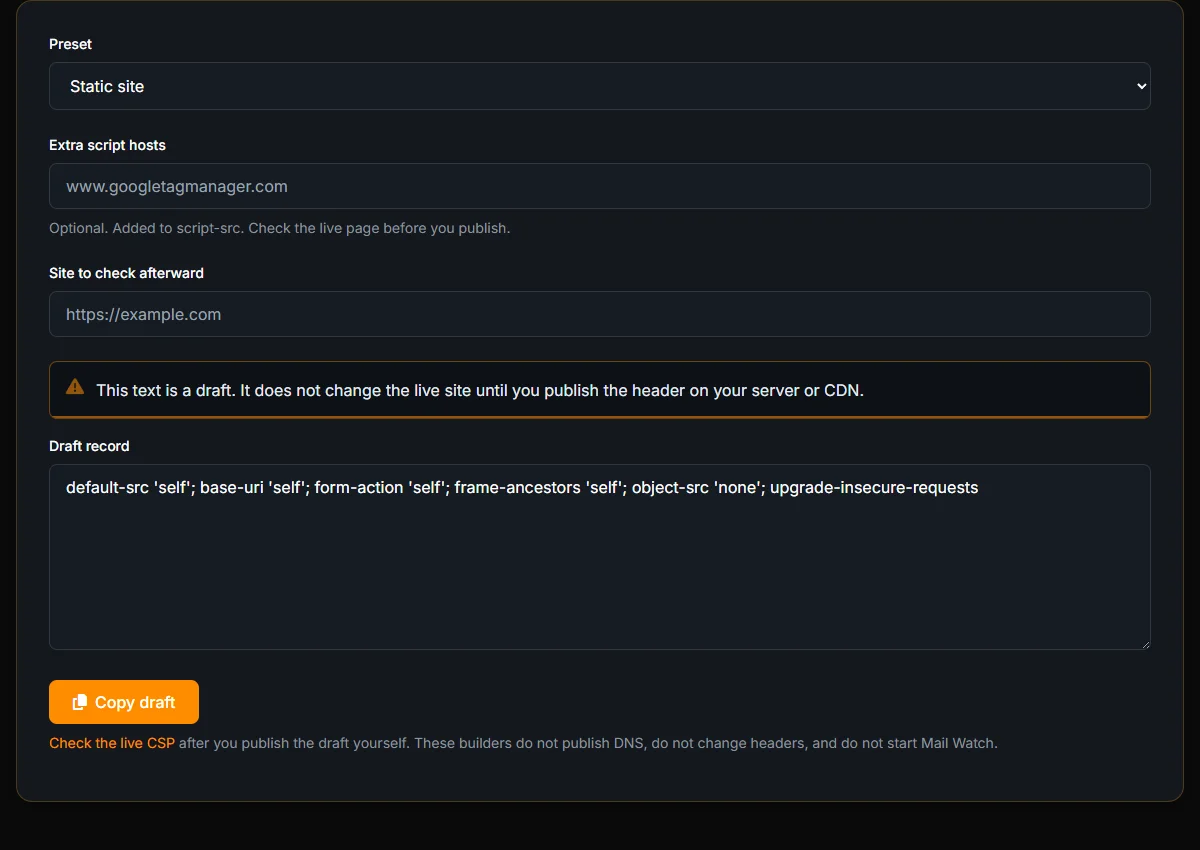
A Content-Security-Policy is a header that tells the browser which scripts, frames, and form targets are allowed. A bad first version can blank a checkout. A missing one leaves the page open to script you did not write. Vulnify’s CSP Builder drafts the header text. The line on the page is exact: this text is a draft. It does not change the live site until you publish the header on your server or CDN.
Pick a preset
The presets are Static site, WordPress, and Shopify. Static is the strict starting point. With nothing else filled in, it drafts:
default-src 'self'; base-uri 'self'; form-action 'self'; frame-ancestors 'self'; object-src 'none'; upgrade-insecure-requests
That policy keeps scripts, forms, and frames on your own origin, blocks plugins, and asks the browser to upgrade HTTP requests. It will break a site that loads analytics, a payment frame, or an inline script. That is the point of starting strict and adding hosts on purpose.
WordPress and Shopify
Those presets exist because those platforms inject inline script and style. The builder warns that unsafe-inline for script or style remains. Read that warning. The preset will not be a strict policy, and it is not a claim that the store is locked down. Extra script hosts are a field on the form. Add the hosts you actually use, not a copy of someone else’s header.
Add a host only because the page broke
Publish the static draft on a staging host first. Load the page. Open the browser’s console. The violations name the hosts the policy blocked. Add those hosts in the extra script field, or in the directive the violation names, and draft again. Adding a host because a blog post listed it is how policies grow a hole. Adding a host because staging refused to load your analytics is how they stay accurate.
WordPress will violate a static policy immediately. The editor, the admin bar, and many plugins use inline script. Switch the preset to WordPress, read the warning that unsafe inline remains, and treat that draft as a temporary header. It reduces some classes of injection. It does not stop an attacker who can already write a script tag into the page. Shopify is the same shape: the preset matches the platform, and the warning is the honest part.
frame-ancestors 'self' stops other sites from framing you. It does not stop you from framing a payment provider. If checkout needs a frame, that host belongs in frame-src, which you add when the console tells you the frame was blocked. form-action 'self' stops a form from posting to a host you did not name. Leave it until a real form needs an external action.
Publish the header, then check it
Put the draft in the header on the server or CDN that serves the site. Then open the CSP Checker against the live URL. The builder cannot see what you deployed. The checker can.
Nonces and strict-dynamic are a tighter pattern than these presets. They are covered in Content-Security-Policy for XSS defense. Use that article when you are ready to remove unsafe-inline, not as a substitute for publishing the draft you just generated.
Header lines for Nginx, Apache, or Cloudflare, including HSTS, are a separate generator: how to draft security headers. This tool is only the CSP text.
Retest on the URL that failed, not on the homepage
After you deploy, run the CSP Checker on the URL that threw the console error. A homepage that does not load the checkout script will look clean and will not prove the checkout policy. If the checker reports a different policy than the draft, a CDN or a second server block is still serving the old header. Search the config for a second Content-Security-Policy. Two policies do not merge the way people hope. The browser applies the intersection, and the page breaks in ways the draft did not predict.
Keep the draft in the ticket with the date you published it. The next person who adds a script tag needs to see which hosts were intentional. The builder will not remember the form after you close the tab. The text you copied is the record.
Frequently Asked Questions
Does the builder install the header?
No. It drafts the policy in the browser. The live site changes only after you publish that header on your server or CDN.
Are the WordPress and Shopify presets strict?
No. They keep unsafe-inline for script or style, and the page warns you. They are starting points for those platforms, not a locked-down policy.
Where do nonces fit?
Not in this builder. Nonces and strict-dynamic are covered in the CSP article linked above. Check the live header with the CSP Checker after you publish anything.